GA4 is great at tracking marketing campaigns and figuring out which channels are bringing people to your website. But if you’re asking questions about your product, like which parts of it keep customers coming back or at what point people are giving up on buying it, GA4’s structural limits – like the 25-parameter restriction per event, and the requirement to register custom dimensions before they show in reports – don’t really help.
PostHog, however, was designed specifically for product analysis, not marketing, so it gets rid of GA4’s restrictions. In our opinion, it’s definitely worth a try. Let’s look at how PostHog works.
What is PostHog and why is it useful for product analytics?
PostHog is an open-source, all-in-one product analytics platform designed for product teams and developers. It wasn’t built from a marketing analytics tool like GA4 was, but instead was created from scratch to monitor how a product is used and what people do with it.
The platform combines several products into what they call a “Product OS”: product analytics, web analytics, session replay, feature flags, A/B testing, surveys, and data warehouse. All of this runs on a single stream of events, and that means you can go from analyzing a funnel drop-off to immediately viewing a session recording of users who failed to convert.
According to PostHog’s official documentation, their architecture lets you “focus on improving your product instead of engineering your data”. And because it’s open-source, you can run it on your own servers or use their cloud version.
How does PostHog’s event structure differ from GA4?
Both PostHog and GA4 claim to be event-based, but they implement this in very different ways.
What are GA4’s event structure limitations?
GA4 was completely redesigned with events at its core, unlike the older Universal Analytics (UA), which was based on sessions. However, it still has structural limitations:
- 500 unique event names limit for apps (no limit for web, but you will hit other constraints).
- 25 event parameters maximum per event (100 on GA360, the paid, enterprise version).
- 100-character limit on parameter values.
- Parameter registration (as custom dimensions) required before they show in standard reports.
You also can’t send a list of values or more complex nested objects as parameters alongside an event unless you turn them into strings (text). Getting the data into BigQuery helps with some of these problems, but most marketing professionals aren’t using SQL to analyze things.
PostHog’s event structure
PostHog removes these restrictions entirely. You can:
- Create unlimited event names.
- Attach unlimited event properties to any event.
- Send arrays and objects as property values.
- Start using properties in reports immediately, with no registration required.
When you capture a purchase event with PostHog, you can include all the items in the shopping cart with full product details, user segment information, and context on that session, all in a single event. GA4 would make you either break this down into separate bits of information (and you can only have 25 parameters), or turn it into strings, and then you’d have to write your own SQL for BigQuery to process it.
What is PostHog’s Autocapture and how does it work?
Autocapture is PostHog’s automatic event tracking feature that records every user interaction without requiring manual implementation code for each element. It automatically captures:
- All clicks on links, buttons, and interactive elements.
- Form submissions and input changes.
- Pageviews and page exits.
- Page scrolling and content interaction.
Each auto-captured event includes the element’s text, CSS selectors, HTML attributes, and position in the DOM hierarchy. This allows for a complete record of user behavior from the get-go.
How does PostHog’s Autocapture compare to GA4’s Enhanced Measurement?
GA4 does some automatic tracking for you with Enhanced Measurement, but it isn’t quite as comprehensive as PostHog’s feature. Enhanced Measurement automatically tracks pageviews, scrolls, outbound clicks, site search, video engagement, and file downloads.
PostHog’s Autocapture is more extensive; it records every click and form interaction by default. PostHog says this gives you “data you didn’t know you needed before you realized you needed it”.
However, Autocapture creates a much larger number of tracked events than GA4’s Enhanced Measurement. For high-traffic websites, you will likely need to use filters or PostHog’s “ignore lists” to decide what gets recorded.
When Autocapture makes sense
Autocapture is particularly useful if you’re:
- Setting up analytics for the first time and aren’t sure what’s important to measure.
- Doing retroactive analysis on user behavior.
- Working without a team of developers to set up specific tracking.
- Running tests and want to quickly analyze unexpected user behavior.
For well-established products with a clear tracking plan, you might want to turn Autocapture off and only use your own custom events. This will help you manage expenses and make sure the data is clean.
How does PostHog handle funnel analysis and audiences?
Both GA4 and PostHog let you group users into cohorts, but they handle this in different ways. GA4’s audiences are mainly for remarketing and activation in Google Ads. PostHog’s cohorts are essentially analysis filters that work across the whole platform.
You can create cohorts based on:
- User properties (email address domain, subscription tier, account creation date).
- Behavioral criteria (performed event X; completed funnel Y).
- Combination of filters using “and” or “or” logic.
- CSV uploads of user lists.
Once you’ve got these groups, they can be used to filter pretty much any information, funnel view, or trend analysis. You can export them as a CSV file or use them as targeting criteria to decide who gets to see new features, and for A/B tests.
What does PostHog’s interface look like?
PostHog’s interface is built around insights and dashboards. Everything starts from the main navigation sidebar, where you can jump directly to the type of analysis you need.
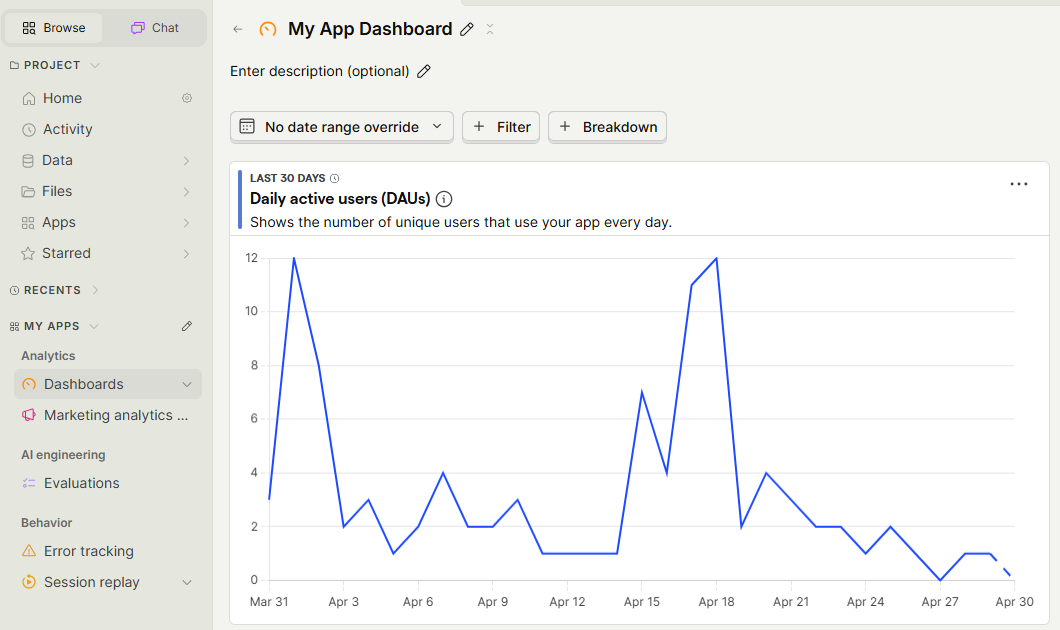
In the Analytics section, depending on what your business focuses on, you can access:
- Dashboards: collections of saved insights, with flexible filters and layouts, that you check frequently. So, useful for tracking common metrics over time.
- Product or marketing analytics insights: where you build custom queries to answer specific questions. It’s equivalent to GA4’s Explorations.
- Trends insights: this is the default insight type in PostHog, which you use to track how metrics change over time and to find patterns in your data.
- Notebooks: a collaborative workspace that combines multiple tools, allowing you to organize ad-hoc analysis, bug investigations, internal documentation, and feature releases.
PostHog vs. GA4: which analytics platform is better?
Here’s a comparison of PostHog and GA4 for the main analytics tasks:
| Feature | PostHog | GA4 |
|---|---|---|
| Primary focus | Product analytics and user behavior tracking | Marketing attribution and acquisition analytics |
| Event name limits | Unlimited | 500 for apps; web has no documented hard limit, but you’ll hit other constraints like the 25-parameter limit |
| Parameters per event | Unlimited | 25 (100 on GA360) |
| Automatic tracking | Autocapture: every click, form interaction, pageview | Enhanced Measurement: pageviews, scrolls, outbound clicks, video plays, file downloads |
| User identification | Full person profiles with all history; anonymous sessions merge when the user identifies | Anonymous-first; User-ID available, but personal data like email is not allowed in the GA4 interface |
| Funnel analysis | Advanced with correlation analysis, time constraints, exclusion steps, and drop-off cohorts | Basic funnel creation in Explorations (limited compared to PostHog) |
| Cohort creation | Dynamic and static cohorts from any analysis or CSV upload | Audiences are primarily designed for Google Ads remarketing |
| Session replay | Built-in; integrates directly with analytics events | Not available; requires third-party tool |
| SQL access | HogQL for custom queries across all data | BigQuery export available (limited to 1M events/day on free tier) |
| Data retention | Up to 7 years on paid plans | 14 months max on free tier; up to 50 months on GA360 |
| Self-hosting option | Open-source version available for complete data control | Not available |
| Pricing model | Free tier: 1M events/month; then tiered pricing from $0.00005/event (volume discounts apply) | Free with limits (14-month retention, data sampling); GA360 typically starts at around $50,000/year |
| Data sampling | No sampling at any volume | Applies sampling to large exploration queries (>10M events) on the free tier |
| Integration ecosystem | Built-in data warehouse, CDP, integrations with 50+ tools | Deep integration with Google Ads, Search Console, and Google Marketing Platform |
When should you choose PostHog over GA4?
PostHog is a better option when:
- You are creating a product and not just doing marketing. In other words, if you want to know how people interact with the different parts of your website, and not just focus on campaign-driven traffic.
- You need B2B metrics. PostHog’s group analytics are really good for SaaS (Software-as-a-Service).
- You want integrated session replay and experimentation. Having recordings of user sessions, feature flags, and A/B testing all in the same place as your analytics stops you from needing lots of different tools and makes it easier to act on insights.
- You are hitting GA4’s event or parameter limits. If you’re at the 500 event name limit or are always deciding which of 25 parameters to include with each event, PostHog’s limitless structure removes these problems.
- You prioritize data privacy and ownership. You can install PostHog on your own servers, giving you full control of where the data is stored, which is useful for GDPR compliance or data sovereignty rules.
- You have technical minds in your team. PostHog is made for product engineers and technical teams, so it expects you to be comfortable with writing code, using SQL and APIs.
So, when is GA4 a better choice?
Well, GA4 is still best when:
- Marketing attribution is your focus. GA4’s integration with Google Ads and Search Console is still the best way to find out which marketing channels are driving conversions.
- You need free, unlimited scale. Despite its drawbacks, GA4’s free service can cope with unlimited traffic and doesn’t charge per event, which is important for high-traffic sites.
- Your team isn’t very technical. GA4 doesn’t require code or SQL knowledge. PostHog, while it is flexible, does take some learning for people who aren’t technical.
- You’re already invested in the Google ecosystem. If your marketing team uses Google Ads and GA4’s audiences for remarketing, changing analytics platforms will make their work more difficult.
Can you use PostHog and GA4 at the same time?
Short answer: yes. Many teams use both PostHog and GA4 at the same time: GA4 for marketing attribution and understanding which campaigns drive traffic, and PostHog for product analytics and understanding how users engage with your website features.
You could even use both for a month or two to compare results and then determine which platform your team actually uses more frequently (and efficiently). The tricky part of doing this is maintaining consistent event naming in both places and not doing the same setup work twice.
Final thoughts
What you need from an analytics platform depends on what you’re trying to do in your business. For marketers, GA4 is generally the answer. But product teams are finding PostHog to be increasingly useful. So, if you are mostly interested in how well your campaigns are performing and where your website traffic is coming from, then continue with GA4. If you’re trying to understand how people actually use your product and need the flexibility to track whatever is important to your business, without limitations, PostHog is worth betting on. PostHog’s free tier (1 million events a month) makes it easy to test alongside your current GA4 setup. After that, you’ll have a good idea of which tool is better for the decisions you’re making.